The ESIC Card Download facility allows employees covered under the Employees’ State Insurance Scheme to access their e-Pehchan Card digitally. The card serves as an important identity document for the insured person under ESIC and helps eligible employees and family members access medical benefits through ESI dispensaries, hospitals, and other authorised healthcare facilities.
If you already have an ESIC Insurance Number, you usually do not need to apply for a completely new card every time you need a copy. Once your details are available in the ESIC system, you can retrieve the ESIC e-Pehchan Card, save the PDF, and download it again whenever required.
This guide explains how to download ESIC Card online, how to access the e-Pehchan Card through UMANG, how family-member details are linked with the card, and what to do if the ESIC Card is not showing, not loading, or cannot be downloaded.
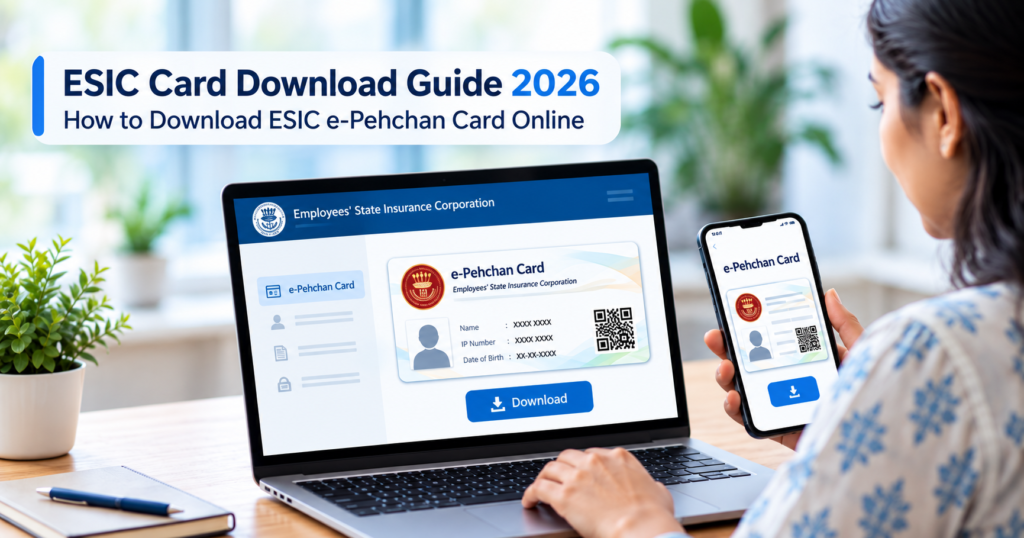
What Is the ESIC e-Pehchan Card?
The ESIC e-Pehchan Card is the digital identity card linked to an employee registered under the Employees’ State Insurance Scheme. It helps identify the insured person and the eligible family members connected with the same ESIC record when medical services or other scheme benefits are used.
The scheme is administered by the Employees’ State Insurance Corporation (ESIC) under the Ministry of Labour and Employment. Eligible insured workers and their families can receive medical care and other social security benefits related to sickness, maternity, disablement, and employment injury.
In everyday use, employees may simply call it the ESIC Card or ESI Card. For online access and download, however, the document is generally provided as the e-Pehchan Card.
So, if you are searching for ESIC Card Download PDF, ESI Card Download, or Pehchan Card Download, you are usually looking for the same digital identity document linked with your ESIC Insurance Number.
What You Need Before Downloading the ESIC Card
Before starting the ESIC Card Download process, keep your basic registration details ready. Having the correct information available can make login, verification, and card retrieval much easier.
| Requirement | Why It May Be Needed |
|---|---|
| ESIC Insurance Number / IP Number | Identifies your ESIC account |
| Registered mobile number | May be used for OTP verification |
| Date of birth | Can be required for identity verification |
| Login credentials | Needed where account access is required |
| Employer details | Useful if more than one employment record appears |
| Updated Aadhaar details | Helps keep identity information accurate |
| Smartphone | Useful for accessing app-based ESIC services |
Your employer usually completes the initial ESIC registration when your employment comes under ESI coverage. After registration, you are allotted a unique Insurance Number, also called the IP Number.
This number is important because it connects your employment record, personal details, family information, and ESIC benefits. Once the record is active and updated, you can use it to access services linked with your account, including the e-Pehchan Card download facility.
How to Download ESIC Card Online in 2026
There are several ways to download the ESIC e-Pehchan Card, and the best option depends on which digital service you can access easily.
In practice, employees can use:
- ESIC insured-person online services
- UMANG
- ESIC Health Connect
- Employer or HR assistance if self-service access does not work
Because ESIC continues to update its digital platforms, the exact menu names and screen layout may vary slightly. The core process, however, remains similar: sign in, verify your ESIC record, open the e-Pehchan Card section, and download the card.
How to Download ESIC e-Pehchan Card Through ESIC Online Services
If you already have access to your ESIC insured-person account, you can check for the e-Pehchan Card option after signing in.
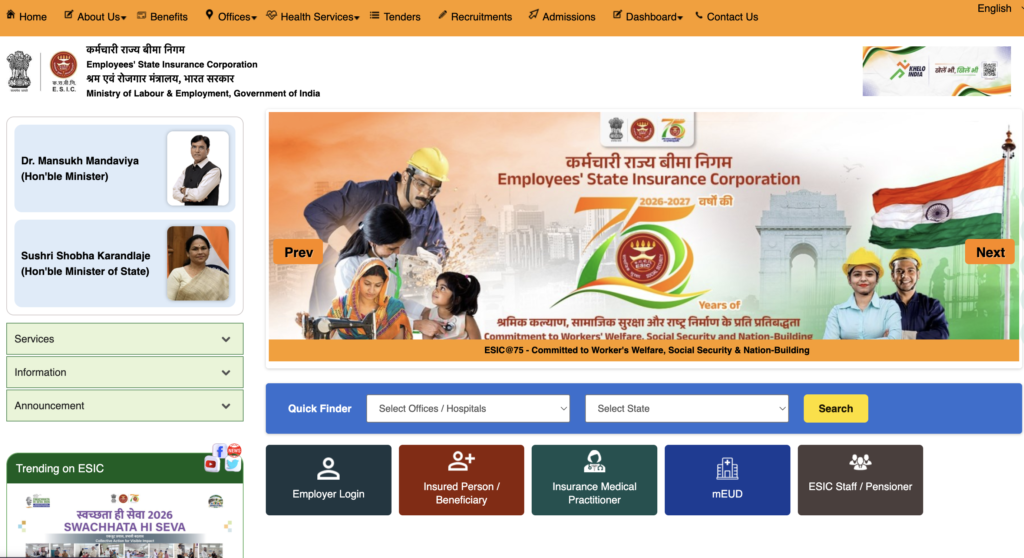
Step 1: Open the Official ESIC Website
Visit the official Employees’ State Insurance Corporation website.
Use the insured-person or beneficiary service meant for employees. Do not confuse it with the employer portal used by companies for compliance and contribution-related work.
Step 2: Sign In With Your ESIC Details
Enter the details requested by the login system.
Depending on the current interface, you may need:
- ESIC Insurance Number / IP Number
- Password
- Captcha
- Registered mobile number
- OTP verification
If you have never used the employee portal before, you may first need to activate or register your account.
Step 3: Open the e-Pehchan Card Section
After logging in, look for an option such as:
- e-Pehchan Card
- Pehchan Card
- Insured Person Card
- Similar identity-card service
Open the relevant section to view your card details.
Step 4: Verify Your Details Before Downloading
Before saving the card, check whether the important information is correct, especially:
- Employee name
- Insurance Number
- Employer details
- Dispensary information, where shown
- Family or dependent details
- Other personal information
This step matters because the e-Pehchan Card is linked to your ESIC record. If family details are missing or incorrect, it is better to get the record corrected instead of simply downloading an outdated card.
Step 5: Download the ESIC Card PDF
Use the available Download, View Card, or Download e-Pehchan Card option.
Save the PDF on your phone or computer and keep a copy somewhere easy to access before visiting an ESI dispensary or hospital.
How to Download ESIC Card Through UMANG
UMANG is a convenient option for employees who prefer accessing ESIC services from a mobile phone.
The platform brings several government services into one place, including ESIC-related employee services.
Step 1: Open UMANG
Install the official UMANG app or use the official UMANG portal.
Step 2: Search for ESIC
Use the search option and select Employees’ State Insurance Corporation (ESIC).
Make sure you open the ESIC employee-related service rather than another department with a similar name.
Step 3: Complete Login or Verification
Follow the authentication process shown by UMANG.
You may be asked to verify your identity using:
- Registered mobile number
- OTP
- ESIC-linked details
Step 4: Select the e-Pehchan Card Service
Look for the option to download the e-Pehchan Card or access your insured-person card.
Step 5: Download and Save the Card
Generate the card and save the ESIC e-Pehchan Card PDF on your device.
UMANG is especially useful when you want a simpler mobile-based route instead of navigating multiple sections on the main ESIC website.
How to Download ESIC Card Through ESIC Health Connect
ESIC Health Connect is another useful digital option for insured persons.
The service includes an E-Pehchan Card feature that allows employees to access and download the card directly from the app.
Steps to Download the Card Through ESIC Health Connect
- Open ESIC Health Connect.
- Sign in as an insured person.
- Open the e-Pehchan Card or insured-person details section.
- Select the relevant employer code if more than one employment record appears.
- Tap Download E-Pehchan Card.
- Save the card on your mobile device.
This method can be particularly useful for employees who already use ESIC’s mobile health services and want to keep their medical and identity-related information accessible in one place.
Which ESIC Card Download Method Should You Use?
For most employees, the easiest option is simply the one that works reliably with your current ESIC record.
- Use the ESIC website if you are comfortable with the employee portal.
- Use UMANG if you prefer a general government-service app.
- Use ESIC Health Connect if you already manage ESIC health services from your phone.
- Contact HR or your employer if your login, Insurance Number, mobile number, or employment record is not working correctly.
If one method fails, that does not necessarily mean your e-Pehchan Card is unavailable. Often the issue is related to account activation, incorrect mobile details, employer records, or platform-specific login problems.
How to Get an ESIC Card From Your Employer
If the ESIC Card download is not working through online self-service options, your employer or HR department can often help resolve the issue.
Employers have access to ESIC registration records from the company side, so they may be able to confirm your insured-person details, update incorrect information, or generate the relevant e-Pehchan Card documentation.
You can ask HR to help with:
- Your ESIC Insurance Number / IP Number
- An updated e-Pehchan Card
- Confirmation that your mobile number is correctly registered
- Correction of employee details
- Correction or addition of eligible family-member details
- Verification that your ESIC registration is active
This route is especially useful if you have recently joined a company and your ESIC record has been created, but you are still unable to access the card yourself.
It can also help when your employer has completed the initial registration but some details have not yet synced properly for employee self-service access.
Who Can Download an ESIC Card?
The ESIC e-Pehchan Card is meant for an Insured Person (IP) registered under the Employees’ State Insurance Scheme.
In most cases, registration is completed through the employer when both the employee and the establishment come under ESIC coverage.
Once the employee is registered, an Insurance Number is allotted. That number becomes the main identity reference used across ESIC services, including the e-Pehchan Card, contribution records, medical benefits, and linked family details.
ESIC Salary Eligibility
A commonly applicable wage ceiling for ESIC coverage is ₹21,000 per month.
Employees whose wages fall within the prescribed limit may be covered under the scheme when they work in an establishment to which ESI provisions apply.
The applicable ceiling can differ for certain categories, including persons with disability, so employees should check the latest eligibility rules when needed.
ESIC Coverage Also Depends on the Establishment
Salary alone does not determine whether an employee is covered under ESIC.
Coverage can also depend on factors such as:
- Type of establishment
- Number of employees
- State or Central Government notification
- Whether the establishment falls under the applicable ESI provisions
This is why it is not always accurate to say that every company with a particular number of employees automatically comes under ESIC.
If you are unsure whether you should have an ESIC Card, the easiest first step is to check with your employer or HR department and confirm whether an ESIC Insurance Number has been allotted to you.
What Information Does the ESIC e-Pehchan Card Show?
The ESIC e-Pehchan Card is more than a simple employee identity card. It is linked to the insured person’s ESIC record and helps establish who is covered under the Employees’ State Insurance Scheme.
Depending on the current ESIC system and card format, the e-Pehchan Card may display or connect with details such as:
- Insured person’s name
- ESIC Insurance Number / IP Number
- Employee and employer information
- Registered family or dependant details
- Dispensary or medical-benefit information
- Other identity details maintained in the ESIC record
Its main purpose is to connect the insured person and eligible family members with the correct ESIC account when medical services or other scheme benefits are required.
For this reason, downloading the card is only one part of the process. The information stored in your ESIC profile must also be accurate and up to date.
Can Family Members Use the ESIC Card?
Yes, eligible family members can receive medical benefits under the ESI Scheme when they are properly registered as dependants in the insured person’s ESIC record.
This makes family-detail accuracy especially important.
For example, if your spouse or child is eligible but does not appear in your ESIC record, downloading the existing e-Pehchan Card again will not automatically add them. The dependant details first need to be added or corrected through the appropriate ESIC update process.
Once the change is approved and reflected in the system, you should download a fresh copy of the e-Pehchan Card so the latest information is available.
Family Member Missing From ESIC Card? Here’s What to Do
A common problem employees face is:
“My ESIC Card is downloaded, but my wife, husband, or child is not showing.”
In most cases, this is not a card-download problem. It means the dependant information has not yet been added correctly to the underlying ESIC beneficiary record.
The practical steps are:
- Check which family member is missing.
- Contact your employer or HR department, or use the available ESIC family-update facility.
- Submit or correct the required dependant details.
- Wait until the updated information is reflected in your ESIC account.
- Download the e-Pehchan Card again.
Do not continue using an old PDF after an important family-detail correction, because the saved card may no longer reflect your latest ESIC record.
Name, Date of Birth or Other Details Wrong on ESIC Card?
If the e-Pehchan Card shows incorrect information, repeatedly downloading the same card will usually not solve the problem.
Common errors include:
- Incorrect spelling of the employee’s name
- Wrong date of birth
- Incorrect gender
- Wrong dependant relationship
- Outdated mobile number
- Missing or incorrect family details
These details usually come from the underlying ESIC database. Therefore, the record itself needs to be corrected before a new card is generated.
Your employer or HR department is often the most practical starting point, especially where the change needs to be processed through employer-side ESIC services.
After the correction appears in the system, download a new e-Pehchan Card and verify the updated details.
How to Download ESIC Card Without Password
If you have forgotten your employee-login password, you may still be able to access the ESIC e-Pehchan Card through other available services.
Use UMANG
If your registered mobile number is active and the service supports OTP-based verification, UMANG may allow you to access ESIC services without relying on the same portal password.
Use ESIC Health Connect
ESIC Health Connect provides another mobile-based route for insured persons to access ESIC information and the e-Pehchan Card.
Contact Your Employer or HR
If self-service login is not working, your employer can help confirm your Insurance Number, registration status, and available e-Pehchan documentation.
The important thing is to avoid creating a second ESIC registration just because you have forgotten your password.
Can You Download ESIC Card Using a Mobile Number?
Your mobile number helps with verification, but it is not your primary ESIC identity number.
Your ESIC account is mainly linked to your Insurance Number / IP Number. The registered mobile number is used for services such as OTP verification, login recovery, and mobile access through platforms like UMANG.
If you have changed your phone number and are no longer receiving OTPs, the mobile number stored in your ESIC record may need to be updated first.
Once the correct number is registered, retry the ESIC Card Download process.
How to Download ESIC Card Using Insurance Number
The ESIC Insurance Number, also called the IP Number, is one of the most important details for locating an insured employee’s ESIC record.
If you know your Insurance Number, the general process is:
- Open the applicable ESIC insured-person service.
- Enter your Insurance Number / IP Number where required.
- Complete password or OTP verification.
- Open the e-Pehchan Card section.
- Download and save the card PDF.
What If You Do Not Know Your ESIC Insurance Number?
You can check:
- Previous ESIC registration documents
- Older e-Pehchan Cards
- Employment or payroll records where the number is shown
- Your employer or HR department
If you have already been registered under ESIC, do not create a new insured-person registration simply because you cannot find your existing Insurance Number. First recover the original number and continue using the same ESIC record.
ESIC Card Download PDF Not Opening? Try These Fixes
Sometimes the ESIC e-Pehchan Card PDF downloads incorrectly, opens as a blank file, or does not appear to respond when you tap the download button. In most cases, this is a browser, session, or temporary portal issue rather than a problem with your ESIC registration.
Try these fixes in order:
| Problem | What You Can Do |
|---|---|
| PDF does not download | Sign in again and retry the download |
| Blank PDF opens | Open the file in another browser or PDF reader |
| Download button does nothing | Temporarily allow pop-ups or downloads in the browser |
| Session expires | Log in again and open the e-Pehchan Card section immediately |
| Mobile browser is not working | Try UMANG or ESIC Health Connect |
| ESIC portal is unavailable | Wait and retry through another official ESIC service |
| Card details are wrong | Correct the underlying ESIC record before downloading again |
Also check the Downloads folder on your phone or computer. In some cases, the ESIC Card PDF has already been saved even though the browser does not show a preview.
ESIC Card Not Found or e-Pehchan Option Not Showing
If your ESIC registration exists but the e-Pehchan Card option is missing, the issue may be related to your account or employment record rather than the card itself.
Employer Registration May Still Be Incomplete
If you joined a company recently, your ESIC registration may have been created but not fully updated across all employee-facing services.
In that case, check with HR to confirm that your registration, Insurance Number, mobile number, and other basic details are complete.
Mobile or Identity Details May Need Updating
Incorrect or incomplete employee information can interfere with OTP verification and digital self-service access.
If your registered mobile number, date of birth, or other identity details are outdated, get them corrected before trying the ESIC Card Download again.
You May Be Using the Wrong ESIC Login
The ESIC employer portal and insured-person services are meant for different users.
Employees trying to download their own e-Pehchan Card should use the insured-person or beneficiary service, not the employer compliance dashboard.
More Than One Employer Record May Be Available
If you have worked with more than one employer under ESIC, the system may show multiple employer records.
In that case, select the relevant employer code before generating the e-Pehchan Card.
It May Be a Temporary Technical Problem
If the card is not appearing on one platform, avoid refreshing the same page repeatedly.
Try another official route such as:
- UMANG
- ESIC Health Connect
- Employer or HR assistance
Using an alternative access method is often faster than waiting on a temporary portal error.
Can You Download an ESIC Card After Changing Jobs?
Yes. Changing jobs does not mean you should create a completely new ESIC identity each time.
Your ESIC Insurance Number / IP Number is designed to continue with you across covered employment.
When you join a new organisation, provide your existing Insurance Number to the employer so the new employment record can be linked correctly.
This helps maintain continuity of:
- ESIC contribution history
- Insurance records
- Family details
- Medical-benefit eligibility
- Existing insured-person identity
If your ESIC account shows more than one employer code, choose the relevant record when downloading the latest e-Pehchan Card.
Is the ESIC Card Required for Treatment?
The e-Pehchan Card is an important identification document when accessing ESIC healthcare services.
It helps the dispensary or hospital verify the insured person and eligible family members linked with the ESIC record. For this reason, it is a good idea to keep the card available before you need treatment rather than trying to download it during a medical visit.
A practical approach is to keep:
- The ESIC e-Pehchan Card PDF saved on your phone
- A printed copy, if convenient
- A valid government-issued photo ID
- Updated dependant details in your ESIC record
Keeping these ready can make verification easier at an ESI dispensary, hospital, or other authorised facility.
Benefits Available Under the ESI Scheme
The ESIC e-Pehchan Card is connected to a much broader social-security system. It is not simply a hospital identity card; it helps link the insured person to medical and other benefits available under the Employees’ State Insurance Scheme.
Major ESI benefits can include:
- Medical Benefit for eligible insured persons and registered family members
- Sickness Benefit during qualifying periods of certified illness
- Maternity Benefit for eligible insured women
- Temporary Disablement Benefit in qualifying employment-injury cases
- Permanent Disablement Benefit where an employment injury results in lasting loss of earning capacity
- Dependants’ Benefit in eligible cases involving death due to employment injury
- Funeral Expenses subject to applicable ESIC rules and limits
- Rehabilitation and certain unemployment-related assistance under eligible ESIC provisions
Eligibility is not the same for every benefit. Simply having an e-Pehchan Card does not automatically make every medical or cash benefit payable.
Factors such as contribution history, insurable employment, qualifying conditions, and the nature of the claim can determine whether a particular benefit is available.
Common ESIC Card Download Problems and Their Solutions
Many ESIC Card Download problems are caused by login, mobile-number, employer-record, or profile issues rather than the card itself.
I Know My ESIC Number but Cannot Log In
If you know your Insurance Number / IP Number but cannot access the account, first try the available password-reset or account-recovery option.
If that does not work:
- Check whether your registered mobile number is correct
- Try accessing ESIC services through UMANG
- Contact HR to confirm your registration details
- Ask whether your insured-person account has been fully activated
I Am Not Receiving the ESIC OTP
OTP problems usually happen when the mobile number stored in the ESIC record is outdated, inactive, or entered incorrectly.
Check whether the number linked with your ESIC registration is still in use.
If you have changed your mobile number, the registered number may need to be updated before OTP-based services start working normally again.
My Old Employer Is Still Showing in ESIC
Seeing an older employer in your account does not necessarily mean there is a problem.
Your ESIC Insurance Number can continue across different jobs, while multiple employment records remain associated with the same insured-person identity.
Do not create a new ESIC registration only because an old employer appears in the account.
My ESIC Card Shows the Wrong Family Members
If the e-Pehchan Card shows missing or incorrect dependants, the problem is usually in the family details stored in the ESIC record.
Get the dependant information corrected first, then download a fresh copy of the card.
I Lost My Printed ESIC Card
Losing the printed card does not mean you need a new ESIC number.
You can normally retrieve the e-Pehchan Card PDF again and save or print another copy using the same existing insurance record.
The ESIC Website Is Not Working
If the main website is temporarily unavailable, try another official access route instead of repeatedly refreshing the same session.
Useful alternatives include:
- UMANG
- ESIC Health Connect
- Employer or HR assistance
This can be especially useful when the problem is platform-specific rather than related to your actual ESIC account.
ESIC Card vs ESIC Insurance Number: What Is the Difference?
The ESIC Insurance Number and e-Pehchan Card are closely related, but they are not the same thing.
| ESIC Insurance Number | ESIC e-Pehchan Card |
|---|---|
| Unique identifier linked to the insured person | Downloadable identification document |
| Used to locate your ESIC insurance record | Shows or connects important insured-person details |
| Continues to remain important across employment records | Can be downloaded again when needed |
| Used for many ESIC services and account-related processes | Useful during medical-service identification and verification |
| More fundamental to your ESIC identity | A document generated from the underlying ESIC record |
The easiest way to understand the difference is this:
Your Insurance Number identifies your ESIC record. The e-Pehchan Card is a document connected to that record.
So, if you lose the PDF or printed card, you have not lost your ESIC insurance identity. The important thing is to recover or use your existing Insurance Number and download the card again.
FAQs
How can I download my ESIC Card online?
You can download the ESIC e-Pehchan Card through the available insured-person services, UMANG, or ESIC Health Connect. After completing the required login or OTP verification, open the e-Pehchan Card section and download the card as a PDF.
What is an ESIC e-Pehchan Card?
The ESIC e-Pehchan Card is the digital identity document linked to an employee registered under the Employees’ State Insurance Scheme. It helps identify the insured person and eligible family members connected with the same ESIC record.
Can I download my ESIC Card on mobile?
Yes. You can access ESIC services on mobile through UMANG and ESIC Health Connect, both of which support employee-facing services linked to the e-Pehchan Card.
Can I download an ESIC Card using my mobile number?
Your registered mobile number may be used for OTP verification and account access, but it is not the main identity number for your ESIC record.
Your ESIC Insurance Number / IP Number remains one of the most important identifiers connected with your account.
How can I find my ESIC Insurance Number?
You can check:
- Previous ESIC registration documents
- Older e-Pehchan Cards
- Employment or payroll records where the number is mentioned
- Your employer or HR department
If you have already been registered under ESIC, recover the existing number instead of creating a duplicate registration.
Can I download the ESIC Card without asking my employer?
Yes. If your self-service access is working, you can use the ESIC insured-person service, UMANG, or ESIC Health Connect without asking your employer each time.
Employer or HR assistance is mainly useful when your registration, mobile number, family details, or login record needs correction.
What should I do if my ESIC Card shows the wrong name?
If the name on your e-Pehchan Card is incorrect, the problem is usually in the underlying ESIC record.
Get the employee details corrected first, then download a fresh e-Pehchan Card after the updated information appears in the system.
Can I download the ESIC Card again if I lose it?
Yes. Losing the printed card or saved PDF does not mean you need a new ESIC Insurance Number.
You can access your existing ESIC record and download another copy of the e-Pehchan Card.
Can my family receive treatment using my ESIC registration?
Eligible family members can receive ESI medical benefits when they are correctly registered as dependants under the insured person’s ESIC account.
If a dependant is missing from the record, the family details should be corrected before relying on the card.
What is the current ESIC employee contribution rate?
The employee contribution is 0.75% of applicable wages, while the employer contribution is 3.25%, making the total contribution 4%.
Contribution rules can change, so employees checking this for payroll or eligibility purposes should verify the latest ESIC notification when needed.
Is ESIC Card and Pehchan Card the same?
In normal employee usage, terms such as ESIC Card, ESI Card, Pehchan Card, and e-Pehchan Card usually refer to the insured person’s ESIC identification document.
For digital download, the document is generally provided as the e-Pehchan Card.
Why is my e-Pehchan Card not showing online?
Common reasons include:
- Incomplete employee registration
- Outdated mobile details
- Incorrect login method
- More than one employer record
- Family or identity details that need updating
- Temporary technical issues on the portal
If the card is not visible through one service, try UMANG, ESIC Health Connect, or employer assistance instead of repeatedly using the same failed session.
Download Your ESIC Card Before You Need It
The best time to complete your ESIC Card Download is before you actually need medical treatment.
Once your registration is active, keep your Insurance Number available, make sure your mobile and family details are correct, and save the latest e-Pehchan Card PDF on your phone.
You now have multiple ways to access the card, including ESIC insured-person services, UMANG, and ESIC Health Connect. If one route is not working, try another official option before assuming there is a problem with your registration.
If the card still cannot be generated, focus on correcting the underlying ESIC record rather than creating a new insured-person identity. Once the account details are accurate, you can download the latest e-Pehchan Card again whenever required.